- Introduction
- How long the window stays open
- What the inbox shows when the window is closed
- Sending a WhatsApp template from the inbox
- Facebook message tags
- Points to keep in mind
Introduction
Meta does not let a business message its clients whenever it likes. After a client writes to you, a messaging window opens, and inside it you can answer freely. Once it closes, a free message is refused, and only a few paid or restricted kinds of message are still allowed.
Knowing when the window closes is what separates a quick answer from a lost client. A question answered 25 hours later on WhatsApp can only be answered with an approved template, which costs money and can't carry a free-form reply.
This document explains how long each channel's window lasts, what the Alaaqat inbox shows when it closes, and what you can still send.
How long the window stays open
The window is counted from the client's last message on that channel. Every new message from the client opens it again for the full length.
| Channel | Window | What you can send inside it |
|---|---|---|
| 24 hours | Any message, from a team member or from a workflow. | |
| 7 days | Any message in the first 24 hours. From 24 hours to 7 days, only replies written by a team member. | |
| 7 days | Same as Facebook. |
For Facebook and Instagram, Meta treats the time between 24 hours and 7 days as a window for human agents: a person may still answer the client's question. Alaaqat marks the replies you type in the inbox as human replies, so they are accepted. Messages sent by workflows are not, so automated messages to Facebook and Instagram clients should go out within 24 hours.
{warning} Do not send promotional content to Facebook or Instagram clients after the first 24 hours. Meta's policy forbids it, and it can restrict the Page's or the Instagram account's ability to send messages.
The inbox keeps track of the window while you work. If it closes while the conversation is open, the message box disappears at that moment, together with Reply and the reactions.
What the inbox shows when the window is closed
The message box is replaced by a notice:
- WhatsApp: You can't send a message to this conversation because it's outside the 24-hour response time window. followed by Use Broadcast Templates.
- Facebook: You can't send a message to this conversation because it's outside the 7-day response time window. followed by Send Tagged Message.
- Instagram: the same 7-day notice, with nothing to send.

You can still read the conversation, see the contact panel, and mark the conversation as read or unread.
Sending a WhatsApp template from the inbox
A template is a message approved by Meta in advance. It is the only way to write to a WhatsApp client after 24 hours, and Meta charges for it. See Templates to create one and Pricing for what it costs.
- In the conversation, click Use Broadcast Templates.
- The dialog Send template to and the client's number opens. Channel is the WhatsApp number of the conversation and can't be changed here.
- In Select Template, choose one of the number's approved templates. Type to search when the list is long.
- Fill in what the template asks for, such as the header image or the values of its variables. The preview shows the message as the client will receive it.
- Click Send.
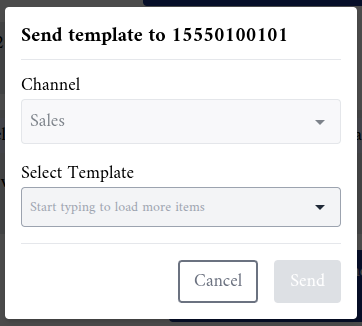
The template appears in the conversation. When the client answers it, the 24-hour window opens again and you can continue with free messages.
You can open the same dialog from the contact panel: the WhatsApp icon next to Details (Send broadcast template via WhatsApp) opens it even when no conversation is open, and there you can choose which of your WhatsApp numbers to send from.
Things that stop a template from being sent:
- Only approved templates are listed. Authentication templates are never listed: they can only be sent through the API. See Send WhatsApp OTP.
- The client has unsubscribed. The template is refused with This contact has unsubscribed and can no longer be sent broadcasts. See the Unsubscribe document.
- The contact is missing a property the template uses. When a variable is filled from a contact property that is empty for this client, Send stays disabled. Fill in the property on the contact first.
- Your plan's monthly message limit is reached.
- Permissions. Sending a template needs Send Messages and View All Broadcast Messages. Choosing the number from the contact panel also needs Create New Broadcast Message.
Facebook message tags
After 7 days, a Facebook client can still be sent a tagged message: a personal update that falls into one of the uses Meta allows.
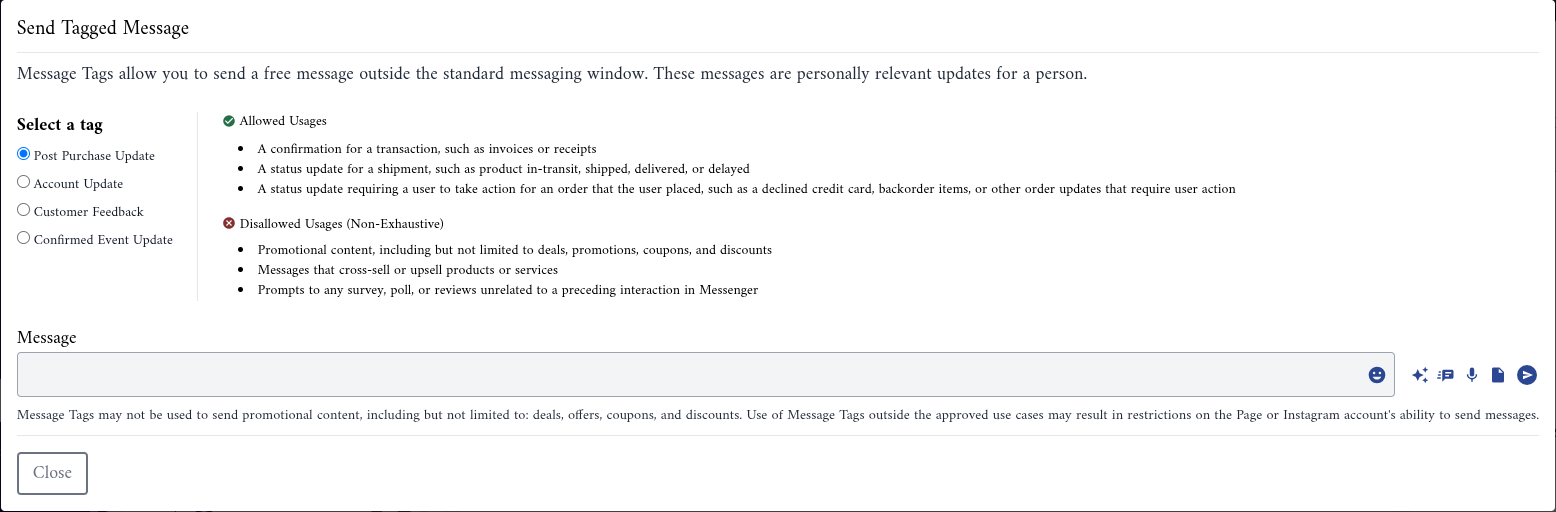
- Click Send Tagged Message.
- Under Select a tag, choose the tag that matches your message. The dialog lists the Allowed Usages and the Disallowed Usages (Non-Exhaustive) of the tag you chose.
- Write your message in the Message box. You can attach files, record a voice note, or insert a canned response, as in the inbox.
- Send it.
| Tag | For example |
|---|---|
| Post Purchase Update | A receipt, a shipping update, or an order that needs the client's action. |
| Account Update | A change in the status of an application, or a fraud alert. |
| Confirmed Event Update | A reminder of an appointment or event the client booked. |
| Customer Feedback | A survey about a purchase or an event. Meta accepts this tag only with its own customer feedback template, so a plain message sent with it fails. |
{warning} Message tags may never carry promotional content: no offers, coupons or discounts. Using a tag outside its allowed uses can get the Page restricted from sending messages.
Tagged messages do not start workflows that use the Message Sent event.
Instagram has no templates and no tags in Alaaqat. After 7 days you can't message the client until they write to you again. Answer Instagram clients early, and use the Unread and Never replied filters to catch the ones still waiting; see Finding a conversation.
Points to keep in mind
- The window belongs to the client and the channel. A client who writes to your WhatsApp number does not open a window on your Facebook Page, nor on your other WhatsApp numbers.
- Your own messages don't extend the window. Only a message from the client does. A long exchange where only you keep writing still closes 24 hours (or 7 days) after the client's last message.
- A message refused for being outside the window is not sent and not charged. If a tab stayed open past the window, the message is refused with the window notice; send a template or a tagged message instead.
- Workflows on Facebook and Instagram. Plan automated follow-ups within 24 hours of the client's message. Later, only a team member's reply is accepted.