Sending WhatsApp Message Templates:
Before sending a WhatsApp message template, make sure it has been approved.
Steps to send message templates:
You can send a message template to an individual contact, or broadcast it to many clients at once. Here are the steps for both cases:
Sending a message template to an individual client:

- Choose a client from the contact list.
- The contact details will appear; click the WhatsApp icon just under the contact image.
- Select your channel and the template you want to send.
Broadcast a bulk message to your clients:
- From Conversations, select Broadcast.
- On the broadcast templates page, select one of the approved templates to send.
- Click the three dots above the template.
- Select Broadcast.
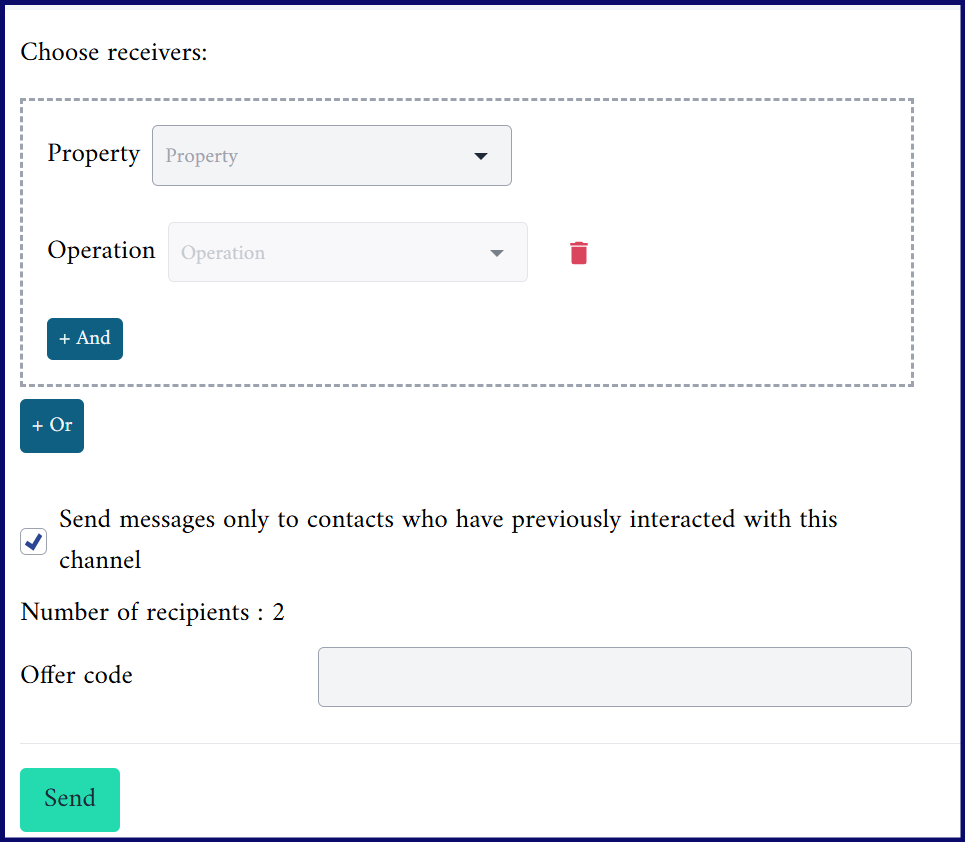
- Select the recipient property.
- Using the Property and Operation fields, you can target recipients by a specific attribute, such as age, country or gender, as shown below:
{info} A broadcast can only reach as many unique recipients per 24 hours as your messaging limit allows. See the Messaging Limits document for the current tiers and how to raise them.
WhatsApp message Template Status:
Templates can have the following statuses:
- Approved: the message template has been reviewed and accepted by Meta, and is available to send to clients.
- Rejected: the message template has been reviewed and rejected for violating one or more of Meta's policies, so it cannot be sent to clients.
- Paused: the message template has been paused because of recurring negative feedback from clients. Templates with this status cannot be sent to clients.
- Pending: the message template has been submitted to Meta for approval and is still under review, so it cannot be used until it is approved.
- In Appeal: the message template is under review after being rejected or paused, following an appeal from the business asking Meta to reconsider its decision.