- Introduction
- Requirements
- What uses AI in Alaaqat
- Step 1: Turn AI on or off
- Step 2: Describe your business
- Step 3: Tone and languages
- Step 4: Opening hours and hand-over rules
- What the AI reads, and what it does not
- Points to keep in mind
Introduction
An AI that does not know your business answers like a stranger: it guesses prices, promises delivery times you don't offer, and answers questions your team would rather handle themselves. A wrong answer sent in your name costs more than a slow one.
The AI settings are what every AI feature in Alaaqat is told about your business before it writes a word: what you sell, how you speak to clients, the languages you serve, when you are open, and which subjects must go to a person. Set them once, and the reply assistant in the inbox and the AI agent in your workflows both follow them.
This document explains each setting and how the AI uses it.
Requirements
| Requirement | Detail |
|---|---|
| Menu | Settings > AI > General. |
| Permission | Manage Account Settings. |
| Plan | AI features are available on paid plans; the Free plan has none. Each plan includes a monthly allowance of AI credits. See the plans on the pricing page. |
The settings apply to the whole account: every AI feature and every team member.
What uses AI in Alaaqat
| Feature | What it does | Where |
|---|---|---|
| Knowledge base | The details the AI answers from: FAQs, prices, policies, product details. | Knowledge base |
| AI assistant | Drafts a reply in the inbox, or rewrites and translates what you typed. A team member always reviews and sends it. | Reply assistant |
| AI Agent Reply | A workflow action that answers clients by itself and hands the conversation to your team when it should not answer. | AI Agent Reply |
Every one of them spends AI credits. See AI credits.
Step 1: Turn AI on or off
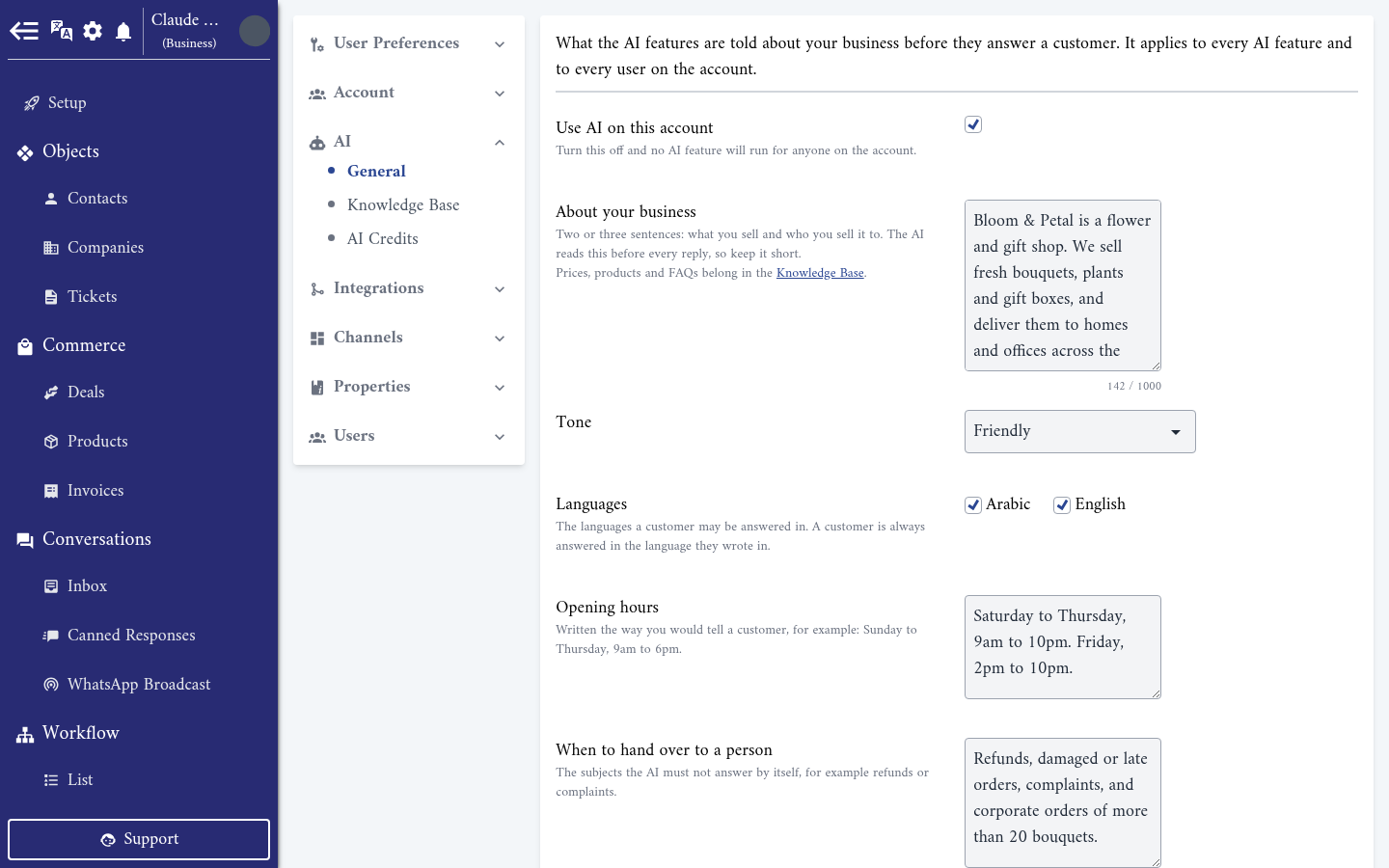
Use AI on this account is ticked by default. Untick it and press Save, and no AI feature runs for anyone on the account:
- The AI assistant in the inbox shows AI is turned off for this account.
- The AI Agent Reply action stops answering. It does not hand the conversation over either, so your team has to watch the inbox themselves.
- New knowledge base content can't be read, and shows Failed.
Your settings and your knowledge base are kept, and everything works again as soon as you tick the box.
Step 2: Describe your business
About your business takes up to 1,000 characters. Write two or three sentences: what you sell and who you sell it to. For example:
Bloom & Petal is a flower and gift shop. We sell fresh bouquets, plants and gift boxes, and deliver them to homes and offices across the city.
The AI reads this text before every reply, so keep it short. Prices, products, FAQs and policies belong in the knowledge base, where the AI looks up only the passages a question needs.
{warning} The AI can only draft replies, and the AI Agent Reply action can only be saved in a workflow, once About your business is filled in and the knowledge base has content.
Step 3: Tone and languages
Tone sets how the AI writes: Formal, Friendly or Neutral. No preference leaves it to the AI.
Languages are the languages a client may be answered in: Arabic, English, or both. Both are ticked by default. A client is always answered in the language they wrote in.
The languages you tick are also the ones the AI assistant offers under Translate to. When none is ticked, it offers both.
Step 4: Opening hours and hand-over rules
Opening hours takes up to 1,000 characters. Write them the way you would tell a client, for example Saturday to Thursday, 9am to 10pm. Friday, 2pm to 10pm. When the AI agent hands a conversation to your team, it tells the client when to expect an answer only if it can read it here. Without opening hours, it just says a team member will get back to them.
When to hand over to a person takes up to 2,000 characters: the subjects the AI must not answer by itself. For example:
Refunds, damaged or late orders, complaints, and corporate orders of more than 20 bouquets.
The AI agent hands these conversations to your team instead of answering. It also hands over by itself when a client asks for a person, complains, or asks something your profile and knowledge base don't answer. See AI Agent Reply.
Press Save at the bottom of the page when you are done.
What the AI reads, and what it does not
When it drafts or sends a reply, the AI reads:
- The settings on this page.
- The last 20 messages of the conversation with that client, on that channel.
- The client's Name, Preferred Language and Relation Stage from their contact record.
- The passages of your knowledge base that match the client's last message.
It does not read:
- The contents of photos, voice notes, videos or documents. It only knows that the client sent one.
- WhatsApp verification codes, failed messages or deleted messages.
- Conversations on other channels, other contacts, or anything else in your account.
Points to keep in mind
- Write nothing here that you would not tell a client. The AI may repeat any of it in a reply, and every member of the account can read it.
- Keep About your business short and true. A long description is read before every reply, and does not help the AI more than the same details in the knowledge base.
- If two team members edit this page at the same time, the last one to press Save wins.
- Turning AI off pauses the AI agent without handing its conversations over. Tell your team before you switch it off.