- Introduction
- Requirements
- Before you delete
- Step 1: Request the deletion
- Step 2: The 14 days before the deletion
- Cancelling the deletion
- What is deleted, and when
- Message retention
- Free accounts nobody uses
- Points to keep in mind
Introduction
Your account holds your clients' names, phone numbers and conversations. When you no longer need it, deleting it is the right thing to do: data protection laws, such as the GDPR, expect a business not to keep personal data longer than it needs it. But a deletion can't be undone, and an account deleted by mistake, or by a team member acting alone, takes every contact and conversation with it.
Alaaqat protects you both ways. Only the account owner can delete the account. The account is locked at once, but the data stays for 14 days, so the owner can still change their mind. After that, everything is erased for good.
This document explains how to delete an account and what happens during those 14 days. It also explains the two rules that delete data without anyone asking: old messages are removed after a period that depends on your plan, and Free accounts that nobody has used for a year are deleted.
Requirements
| Requirement | Details |
|---|---|
| Who | The account owner, and nobody else. Other members of the super admin team don't see the Delete Account button. See The account owner. |
| Password | The owner's Alaaqat password, to confirm the request. |
Before you delete
Once you request the deletion, the account locks for everyone, you included. You can't open any of its pages to fetch something you forgot. Do these first:
- Export your data. Export the contacts, deals, tickets and other records you want to keep; see Import and Export.
- Download your invoices. Your payment invoices are on Settings > Account > Plan, in the Billing section. They are deleted with the account.
- Tell your team. Everyone loses access at the same moment.
- Check whether someone else should own the account instead. If the business goes on without you, transfer the ownership instead of deleting the account; see Transferring the ownership.
- Stop sending verification codes through Alaaqat. API keys stop working when the account locks. A website that sends WhatsApp verification codes through Alaaqat can't send them any more.
Step 1: Request the deletion
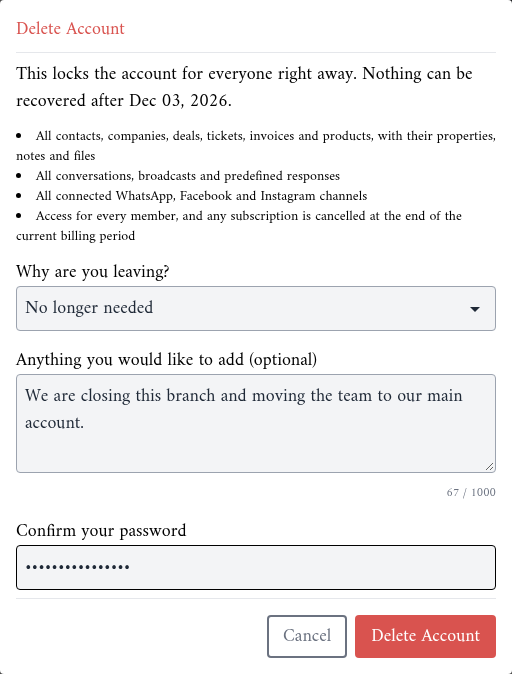
- Go to Settings > Account > General. At the bottom of the page, the Delete Account section explains what happens.

- Click Delete Account. The dialog shows the date after which nothing can be recovered, and lists what will be deleted.
- In Why are you leaving?, choose a reason. In Anything you would like to add (optional), add details if you like, up to 1,000 characters.
- In Confirm your password, type your password.
- Click Delete Account.
{info} If you always log in with Google and never set a password, set one first: log out, click Forgot your password? on the login page, and follow the email.
Step 2: The 14 days before the deletion
From the moment you click Delete Account:
- The account is locked for everyone. Any team member who opens it sees a page that says the account is scheduled for deletion, with the date. Nobody can open the inbox, the contacts or the settings.
- Every member of the super admin team gets an email saying who requested the deletion and when the data will be erased.
- API keys stop working. Requests to the Alaaqat API with the account's keys are refused.
- Your subscription is cancelled at the end of the current billing period.
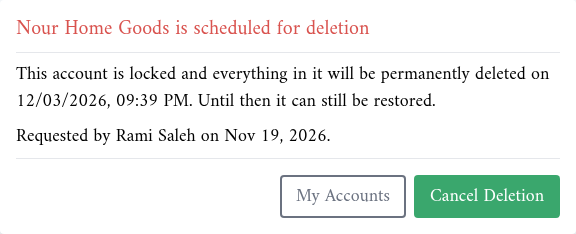
Your team members can still log in to Alaaqat. They can open their other accounts, or click My Accounts and create a new one.
Cancelling the deletion
Until the date shown, the owner can call the deletion off:
- Open the account. The page that says the account is scheduled for deletion appears.
- Click Cancel Deletion and confirm.
The account unlocks straight away, and nothing is deleted. A subscription that was cancelled by the request starts renewing again. Every member of the super admin team gets an email saying the deletion was cancelled.
Only the owner sees Cancel Deletion. Other team members see Only "owner name", the account owner, can cancel this. Get in touch with them if this was not meant to happen.
What is deleted, and when
On the date shown, Alaaqat erases the account for good:
- every contact, company, deal, ticket, invoice and product, with their properties, notes and files;
- every conversation, broadcast, canned response, workflow, report and knowledge base entry;
- the connected WhatsApp numbers, Facebook pages and Instagram accounts, which are disconnected from Alaaqat;
- the account's payment invoices, and everything else stored in the account.
Every team member gets a last email saying the account was deleted.
What happens to your team members' logins: a team member who belongs to no other account has their Alaaqat login deleted too. A team member who also belongs to another account keeps their login and that other account.
{warning} After the deletion date, nothing can be recovered, not even by the Alaaqat support team.
Message retention
Alaaqat keeps your conversation messages for a period that depends on your plan. Every day, the messages older than that period are deleted.
| Plan | Messages are kept for |
|---|---|
| Free | 6 months |
| Starter | 12 months |
| Business | 18 months |
| Enterprise | The period set in your Enterprise plan |
Points to keep in mind:
- Only messages are deleted. Your contacts, deals, tickets and other records stay, whatever their age.
- The period follows your current plan. If you move to a plan with a shorter period, the older messages are deleted on the next daily run. For example, moving from Business to Free removes every message older than 6 months.
- Deleted messages can't be recovered. If you need a record of a conversation for longer, keep it outside Alaaqat, for example as a note on the contact.
Free accounts nobody uses
A Free account that nobody has used for 12 months is deleted. This rule only applies to accounts without a paid subscription: the Free plan, or a paid plan that was cancelled and has ended. Paid accounts are never deleted this way.
An account counts as used when a team member opens it in Alaaqat, or when one of its API keys is used.
The steps:
- After 12 months without use, every member of the super admin team gets an email: "account name" will be deleted unless you sign in by "date". The date is 30 days later.
- 7 days before that date, they get the same email again as a reminder.
- If nobody opens the account by that date, the deletion is requested automatically. The account locks, and the usual 14 days begin; see The 14 days before the deletion. The page says the deletion was scheduled automatically because nobody had signed in for 12 months.
- At the end of the 14 days, the account is erased; see What is deleted, and when.
In total, the data is erased 12 months, 30 days and 14 days after the account was last used.
To keep the account, any team member opens it in Alaaqat before the date in the email. That is enough. If the account is already locked, only the owner can save it, with Cancel Deletion; see Cancelling the deletion.
Points to keep in mind
- Deleting the account doesn't delete your login. You can still log in, use your other accounts, or create a new one.
- Leaving an account is not deleting it. To stop working in an account that is not yours, ask an administrator to remove you; see Removing a team member.
- Your clients keep their copy. The conversations stay on your clients' phones. Deleting the Alaaqat account only removes what Alaaqat stores.
- Check your super admins' email addresses. The warnings about Free accounts nobody uses are only sent to the super admin team. If none of their addresses is read, nobody sees the warning.