- Introduction
- Requirements
- How it works
- Step 1: Create an authentication template
- Step 2: Buy OTP credits
- Step 3: Create an API key
- Step 4: Send codes from your system
- Following your balance
- Low-credit alerts
- When the balance runs out
- Points to keep in mind
Verification Codes (OTP)
When a client signs up, logs in or confirms a payment on your website or app, you often need to check that the phone number is really theirs. The usual answer is a one-time code. Sent by SMS, it can arrive late, cost more in some countries, or not arrive at all. Sent on WhatsApp, it arrives in an app the client already uses, under your verified business name, with a button that copies the code in one tap.
Alaaqat delivers these codes through a WhatsApp authentication template. Your system asks for a code through the Alaaqat API, and the client receives it on WhatsApp. This document shows the setup from your side of the app: the template, the credits that pay for each code, and the alerts that warn you before they run out. The API calls themselves are described in the API reference.
Requirements
| Requirement | Details |
|---|---|
| Plan | Every plan, including Free. On Free, the API key you create can only send verification codes. See the plans on the pricing page. |
| Channel | An active WhatsApp number. See Channel management. |
| Template | An approved authentication template, created in Step 1. |
| Credits | A positive OTP credit balance, bought in Step 2. |
| Permissions | Create New Broadcast Message to create the template. Manage Billing and Subscriptions to see and buy OTP credits. |
How it works
- You create an authentication template once, and Meta approves it.
- You buy OTP credits once, and top them up when they run low.
- Each time a client needs a code, your system calls the Alaaqat API. Alaaqat sends the code on WhatsApp and takes one credit.
OTP credits pay only for verification codes. They are separate from your plan's monthly message allowance: codes don't count towards the allowance, and the allowance can't be used to send codes.
Step 1: Create an authentication template
- Go to Conversations > WhatsApp Broadcast and click New Template.
- Enter a Name, choose the Language and the Channel, then set Category to Authentication.
- Choose the options under Content. The preview on the right shows the message as the client will see it.
- Click Submit to send the template to Meta for review.
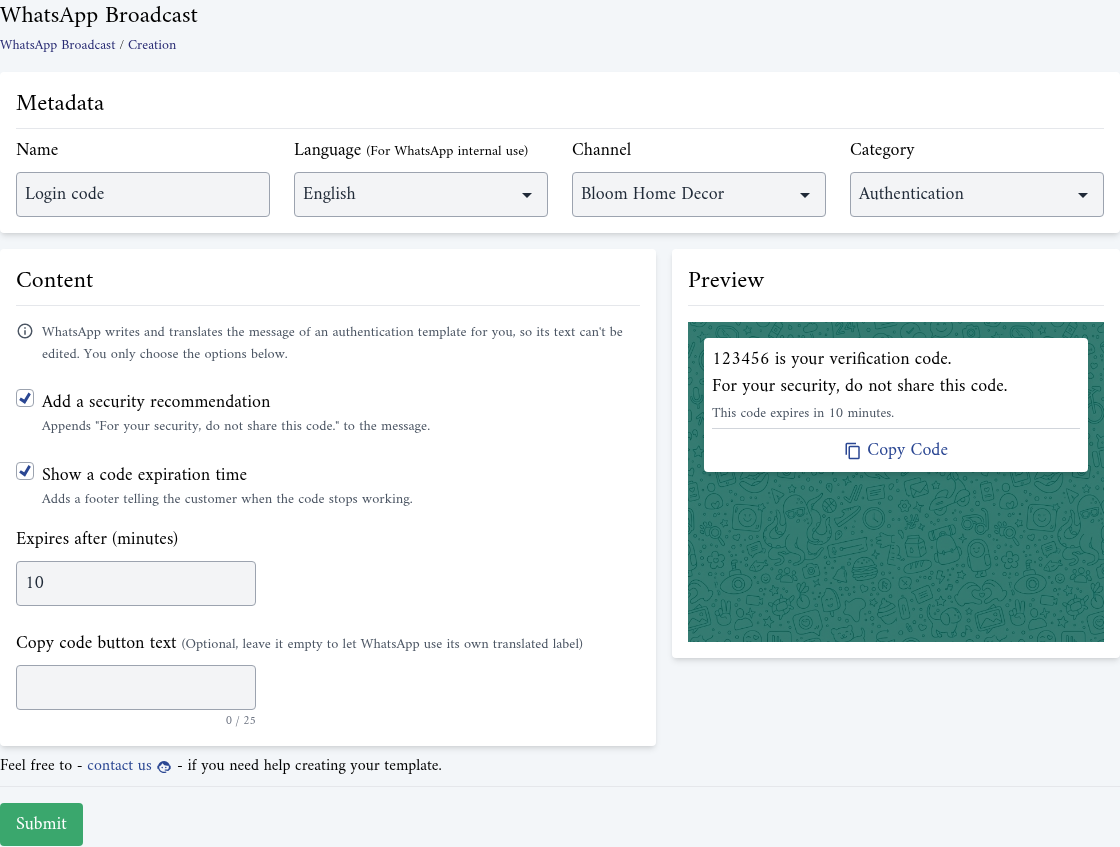
WhatsApp writes and translates the text of an authentication template itself, so you can't edit it. The message always reads like "123456 is your verification code." in the language you chose. You only choose:
| Option | What it does |
|---|---|
| Add a security recommendation | Appends "For your security, do not share this code." to the message. |
| Show a code expiration time | Adds a footer telling the client when the code stops working. Set the minutes in Expires after (minutes), from 1 to 90. |
| Copy code button text | The label of the button that copies the code, up to 25 characters. Leave it empty to let WhatsApp use its own translated label. |
The expiry you show here is only text in the message. Match it to how long your system really accepts the code.
Once Meta approves the template, its status changes to Approved on the Broadcast Templates page. See Templates for the review process and statuses.
{info} An authentication template can only be sent through the API. Broadcast is not available for it, and it can't be sent from a conversation either.
Step 2: Buy OTP credits
Go to Settings > Account > OTP Credits.
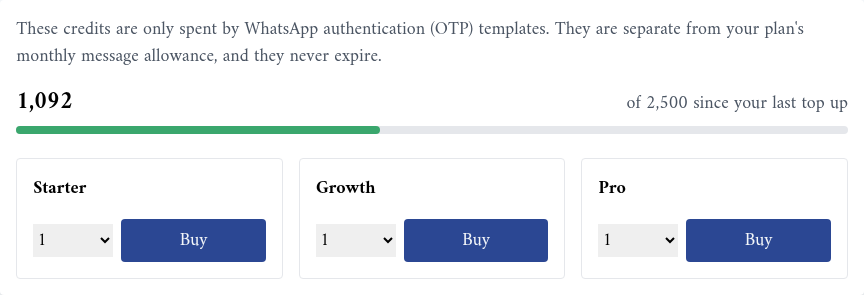
The page shows your balance and three packages: Starter, Growth and Pro. Each package shows its price, its number of credits and the price per message.
- Choose how many of a package you want, up to 10 in one purchase.
- Click Buy and complete the payment.
- The message "Payment received, your credits will appear in a moment." appears, and the balance updates shortly after.
Credits never expire, and you can buy again at any time.
Step 3: Create an API key
Your system authenticates to the API with a key created in Settings > Integrations > API. Give it the ability to send verification codes. On Free, the key you can create is limited to verification codes. See Authentication for creating, rotating and revoking keys.
Step 4: Send codes from your system
Your developers call two endpoints:
- Send WhatsApp OTP sends a code to a contact or a phone number. Alaaqat can create the code for you, or deliver one your system created.
- Verify WhatsApp OTP checks the code the client typed, when Alaaqat created it.
A phone number that isn't a contact yet gets a new contact, so the conversation shows up in your inbox. The code itself is masked there, so your team never sees it.
Following your balance
On Settings > Account > OTP Credits:
- The large number is your current balance. Next to it, "of ... since your last top up" shows what the balance was right after your last purchase.
- The bar shows what is left of that amount. It turns orange at 30% and red at 10%.
- Credit History lists every change to the balance:
| Type | Meaning |
|---|---|
| Purchase | Credits you bought. |
| Verification code sent | One credit taken for one code. |
| Refund | A refund recorded on your balance. |
A credit is taken only once WhatsApp has accepted the message. A send that fails costs nothing.
Low-credit alerts
Alaaqat warns you when the balance drops to 30%, 20% and 10% of what it was after your last top-up. Each alert is sent once, and buying credits starts the count again from the new balance.
The alert, OTP Credits Running Low, goes to the team members with the Manage Billing and Subscriptions permission and to the members of the Super Admin team, through the channels each of them chose in their notification settings.
{info} The alert email may say to top up from Settings then Billing. The credits are bought in Settings > Account > OTP Credits.
When the balance runs out
At zero, sending verification codes stops. The OTP Credits page shows "Your balance is empty, sending verification codes is paused until you top up.", and the API refuses every new code until you buy credits.
{warning} An empty balance means your clients can't sign up or log in wherever you rely on WhatsApp codes. Keep an eye on the alerts, and top up before the 10% alert.
Points to keep in mind
- One credit per code. Resending a code to a client who didn't receive it takes another credit.
- Credits belong to the Alaaqat account. They are shared by all your WhatsApp numbers and authentication templates.
- Codes don't use your plan's allowance, and running out of the allowance doesn't stop codes.
- Broadcasts can't carry codes. Verification codes go out one at a time, through the API only.