- Introduction
- Requirements
- Opening the logs
- Reading the list
- Run details
- Rejected messages
- Points to keep in mind
Broadcast Logs
A broadcast is paid for message by message, so you need to know what each one actually achieved: how many messages WhatsApp accepted, how many it refused and why, and how many clients read them. A run that quietly fails for half of its recipients costs you the clients you meant to reach. A reason that keeps coming back, such as numbers that aren't on WhatsApp, tells you to clean up your contact list before the next broadcast.
Every time you send a broadcast, Alaaqat records a run in Broadcast Logs. This document explains how to read it.
Requirements
| Requirement | Details |
|---|---|
| Menu | Conversations > WhatsApp Broadcast > Broadcast Logs. |
| Permission | View All Broadcast Messages. |
Opening the logs
There are two ways in:
- On the Broadcast Templates page, click Broadcast Logs to see every run of every template.
- Click the three dots on a template and choose Logs to see that template's runs only.
Use the All Templates list above the table to switch between templates.
Reading the list
Each row is one run, newest first.
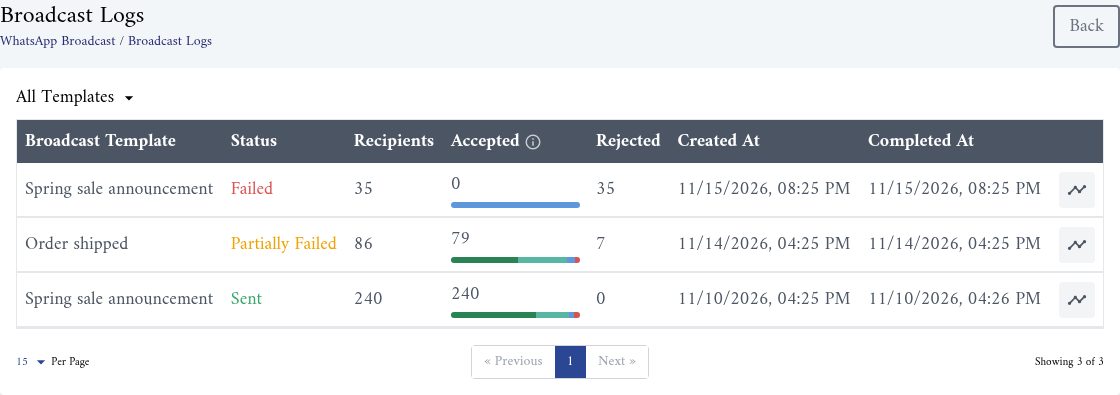
| Column | What it shows |
|---|---|
| Broadcast Template | The template that was sent. |
| Status | Where the run stands, see below. |
| Recipients | How many contacts the run targeted when you sent it. |
| Accepted | How many messages WhatsApp accepted. The bar under the number splits them by what happened next, see Run details. |
| Rejected | How many messages WhatsApp refused, so they were never sent. |
| Created At | When you sent the broadcast. |
| Completed At | When the last message of the run was handled. |
The status of a run is one of:
| Status | Meaning |
|---|---|
| Pending | The run is still sending. The counts grow as it goes. |
| Sent | Every message was accepted. |
| Partially Failed | Some messages were accepted and some were rejected. |
| Failed | No message was accepted. |
Run details
Click the chart icon at the end of a row to open Run details.
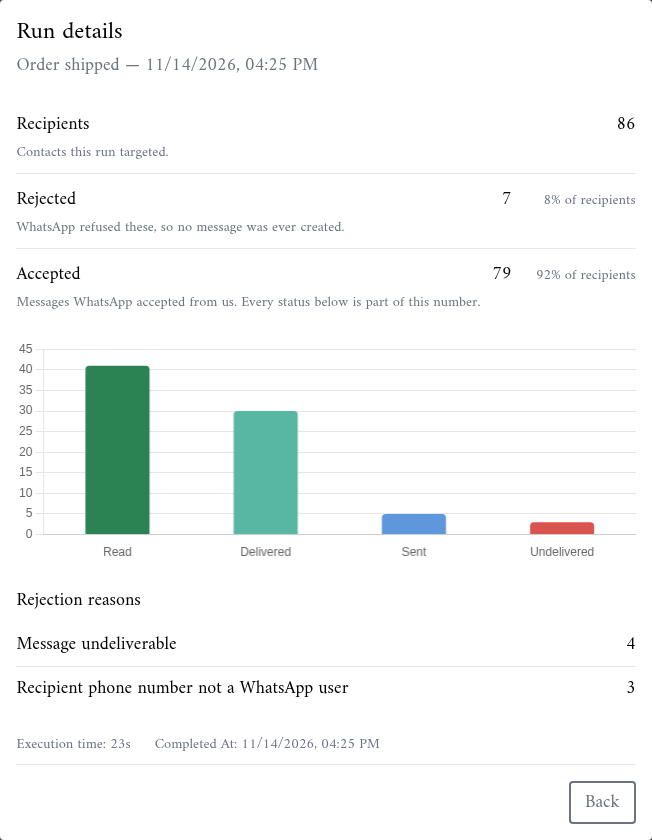
The top part follows the run from start to end:
- Recipients: the contacts this run targeted.
- Rejected: the messages WhatsApp refused, with their share of the recipients.
- Accepted: the messages WhatsApp accepted, with their share of the recipients.
The chart then splits the accepted messages by their latest status:
| Status | Meaning |
|---|---|
| Read | The client opened the message. |
| Delivered | The message reached the client's phone. |
| Sent | Handed to WhatsApp, still waiting for a delivery receipt. This number drops as receipts arrive. |
| Undelivered | Accepted, but WhatsApp later reported it could not be delivered. |
| Unaccounted | Accepted, but no status has been recorded yet. |
The statuses keep changing after the run ends, as clients receive and read your message. Open the details again later to see the final picture.
At the bottom, Execution time shows how long the run took, and Completed At when it ended.
Rejected messages
Rejection reasons lists each reason WhatsApp gave and how many messages it hit, the most frequent first. The reasons are shown exactly as WhatsApp returns them, in English, so search for the text in Meta's documentation when one is unclear.
Two reasons are worth acting on before the next broadcast:
- A number that is not a WhatsApp user. Correct the contact's WhatsApp number, or leave such contacts out of your next broadcast with a filter.
- A payment issue. Check the payment method of your WhatsApp Business Account in Meta Business Manager. Meta refuses every message until it is fixed, so the whole run fails.
A rejected message that has no reason in the list was stopped before it reached WhatsApp. This happens when a contact's property used by a template variable is empty.
Points to keep in mind
- Accepted plus Rejected can be lower than Recipients. A client who unsubscribes while the run is sending is dropped before their turn and counts as neither.
- Meta bills delivered templates. A rejected message never reaches the client. See Pricing.
- Each message also appears in the client's conversation in the inbox, with its own status.
- The logs show runs, not single sends. A template sent to one client from their conversation or contact page does not create a run.